Resize Image by Inches
Resize images to exact inch dimensions with DPI control for US print sizes like 4x6 and 8x10. Free, and it runs in your browser, so files are never uploaded. No account, no watermark.
Resize an image by inches to prepare it for US print formats directly in your browser. This free inches image resizer turns your inch dimensions and DPI into the exact pixels needed, so a 4x6 photo, 5x7 print, 8x10 portrait, or 8.5x11 letter document comes out sharp and correctly sized. All processing is 100% client-side with WebAssembly and Canvas, so your images are never uploaded, and the tool is free with no account, watermark, or limits.
Why resize in inches for US print
In the United States and several other regions, print sizes are specified in inches: photo prints, letter and legal paper, frames, and greeting cards all use inch measurements. If your final output is a physical print at a standard US size, entering inches is the most natural and error-free approach.
Inches connect to pixels through DPI (dots per inch), which is literally defined in inches. That makes inch-based resizing especially clean: pixels = inches x DPI, with no conversion constant to remember.
How inches, pixels, and DPI relate
The formula is simply pixels = inches x DPI, and to reverse it, inches = pixels / DPI. DPI sets how many pixels are printed per inch, so higher DPI means sharper prints and larger pixel dimensions for the same physical size.
For photo prints, 300 DPI is the professional standard. Large posters viewed from a distance can use 150 DPI, while 72 DPI is screen-only and too low for print. Enter your inch dimensions, choose a DPI, and the resizer computes the exact pixels.
- Pixels = inches x DPI (no conversion constant needed)
- 4 x 6 inches at 300 DPI = 1200 x 1800 pixels
- 5 x 7 inches at 300 DPI = 1500 x 2100 pixels
- 8 x 10 inches at 300 DPI = 2400 x 3000 pixels
- 8.5 x 11 inches (US Letter) at 300 DPI = 2550 x 3300 pixels
US print sizes in pixels, at every common DPI
Inches only become pixels once you fix a DPI. Multiply the inch measurement by the DPI and you get the pixel dimension the printer needs — a 4 × 6 print at 300 DPI is 1200 × 1800 pixels.
Use the 300 DPI column for photo prints, 200 DPI for everyday documents, and 150 DPI when the print will be viewed from a distance.
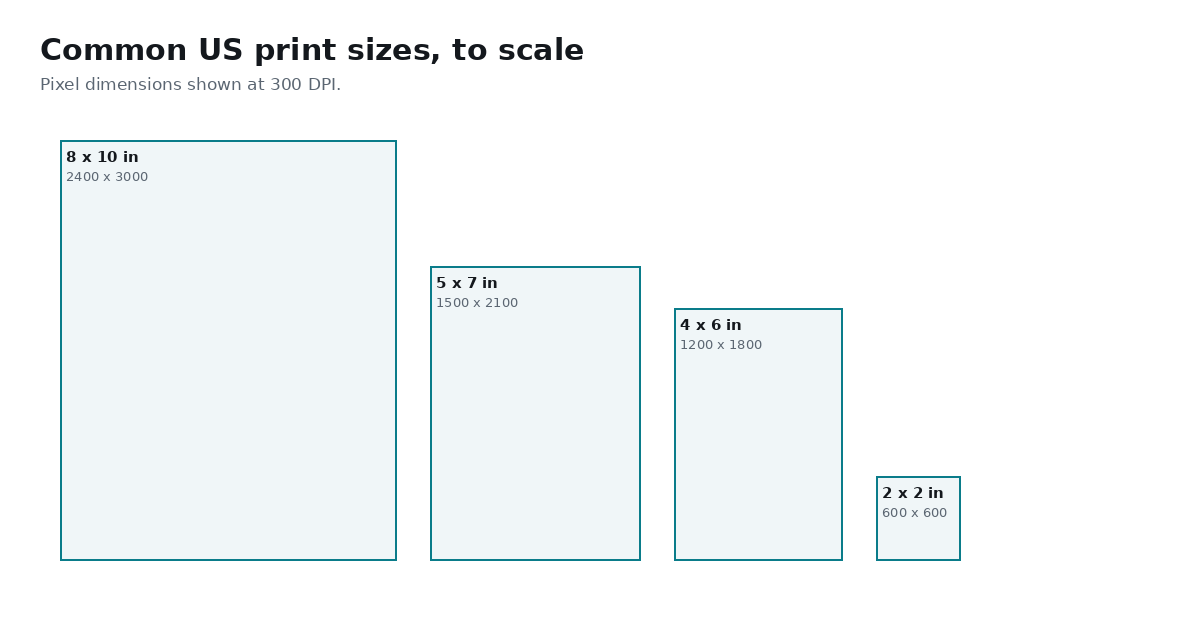
| Print size | 300 DPI | 200 DPI | 150 DPI |
|---|---|---|---|
| 2 × 2 in (US passport) | 600 × 600 | 400 × 400 | 300 × 300 |
| 4 × 6 in | 1200 × 1800 | 800 × 1200 | 600 × 900 |
| 5 × 7 in | 1500 × 2100 | 1000 × 1400 | 750 × 1050 |
| 8 × 10 in | 2400 × 3000 | 1600 × 2000 | 1200 × 1500 |
| 8.5 × 11 in (US Letter) | 2550 × 3300 | 1700 × 2200 | 1275 × 1650 |
| 11 × 17 in (Tabloid) | 3300 × 5100 | 2200 × 3400 | 1650 × 2550 |
Common US print sizes in inches
These are the standard American photo and paper sizes. Use them as ready targets and set 300 DPI for photo-quality output.
- 4 x 6 in - standard photo print
- 5 x 7 in - medium photo / greeting card
- 8 x 10 in - portrait print
- 11 x 14 in - large framed print
- 8.5 x 11 in - US Letter document or flyer
- 8.5 x 14 in - US Legal document
- 2 x 2 in - US passport photo
Aspect-ratio locking so prints are not stretched
Locking the aspect ratio keeps your image in proportion as you set inch dimensions, so photos and portraits are not distorted on paper. This is the safe default for anything with faces or fine detail.
Standard print sizes have different shapes (4x6 is not the same ratio as 5x7 or 8x10), so a single photo rarely fits every size perfectly. Resize with the ratio locked to fit, then crop to the exact frame, rather than stretching to force both inch dimensions.
Quality, upscaling, and resolution checks
Print rewards resolution. To print sharp at 300 DPI, your original needs roughly the calculated pixel count: an 8 x 10 print needs about 2400 x 3000 pixels. If your source is smaller, the tool must upscale and detail will soften.
Downscaling a big camera photo to a 4 x 6 print looks excellent. Trouble only appears when enlarging a small image to a large print, so start from your highest-resolution original, and for very large prints consider 150 DPI if you do not have enough pixels for 300.
- Use 300 DPI for photos, 150 DPI for large posters
- Check that your original meets the calculated pixel size
- Downscale freely; upscale only moderately to keep prints sharp
Private, offline, and free
The inch-to-pixel conversion and the resize both run locally in your browser, so your images are never uploaded or stored on any server. The tool works offline once loaded, and there is no account, watermark, or limit on how many images you prepare for US print.
How to resize an image by inches for print
- Open the Resize Image by Inches tool and load your image - it opens instantly in your browser.
- Enter your target width and height in inches (for example 4 x 6 in).
- Set the DPI - choose 300 for photo prints or 150 for large posters.
- Keep the aspect-ratio lock on, then crop to the exact frame if your photo's shape differs.
- Check the calculated pixel dimensions against your original's resolution.
- Download the print-ready image - processed locally and never uploaded.
Frequently Asked Questions
How to resize an image to 4x6 inches?
Open the inches resizer, enter 4 inches width and 6 inches height, set DPI to 300, and download. That produces 1200 x 1800 pixels (pixels = inches x DPI), the standard size for a 4 x 6 photo print.
How many pixels is 8x10 inches at 300 DPI?
8 x 10 inches at 300 DPI is 2400 x 3000 pixels, because pixels = inches x DPI (8 x 300 and 10 x 300). At 150 DPI it would be 1200 x 1500 pixels.
How do I convert inches to pixels for an image?
Multiply inches by DPI: pixels = inches x DPI. For example, 5 inches at 300 DPI is 1500 pixels. The inches resizer does this automatically when you enter your size and DPI.
What pixel size is US Letter (8.5x11 inches) for printing?
US Letter at 300 DPI is 2550 x 3300 pixels (8.5 x 300 and 11 x 300). At 150 DPI it is 1275 x 1650 pixels. Enter 8.5 x 11 inches and pick your DPI to get a print-ready page.
What DPI should I use to resize an image for printing in inches?
Use 300 DPI for photos and detailed prints, which is the professional standard. 150 DPI works for large posters viewed from a distance, while 72 DPI is only suitable for screens.
How do I resize an image to 5x7 inches without stretching?
Enter 5 x 7 inches with the aspect-ratio lock on so the image stays in proportion, then crop to the 5 x 7 frame. Because 5x7 differs from most camera ratios, cropping avoids the distortion you would get by forcing both dimensions.
How many inches is my image based on pixels?
Use inches = pixels / DPI. For example, a 1200-pixel-wide image at 300 DPI is 1200 / 300 = 4 inches wide. The physical size depends on the DPI you print at.
Are my images uploaded when resizing in inches?
No. All conversion and resizing happens in your browser with WebAssembly and Canvas, so images never leave your device. The tool works offline once loaded and adds no watermark.
Is the inches image resizer free?
Yes. It is completely free with no account, no watermark, and no limit on how many images you resize for print.
Related tools
Related guides