YouTube Banner Resizer
Build YouTube channel art at 2560x1440 with the safe zones marked, so nothing important gets cropped on mobile or TV. Free, runs in your browser, never uploaded. No account, no watermark.
The imgbox YouTube Banner Maker creates channel art at the correct 2560 x 1440 size with the safe zones marked so your text and logo stay visible on every device. Crop your image to YouTube's exact specification and keep the key elements inside the 1235 x 338 safe area that shows up everywhere from phones to TVs. Everything runs in your browser, so your image is never uploaded to a server.
What a YouTube banner maker does and why it matters
YouTube channel art is one image that is displayed at very different sizes on phones, tablets, desktops, and TVs. YouTube crops the same 2560 x 1440 upload differently on each device, showing only a small central strip on mobile but a much wider area on TV. A banner maker helps you size the full image correctly and, crucially, keep your channel name and logo inside the region that is visible everywhere.
imgbox does this in the browser with Canvas and WebAssembly. Your image is processed on your own device and never uploaded, there is no watermark, and there is no account or limit. You get precise control over the crop and safe zone without handing your artwork to a third party.
- Sizes your image to YouTube's full 2560 x 1440 canvas
- Keeps key elements inside the safe area visible on all devices
- No upload, no watermark, no account, no limits
- Works offline in the browser once loaded
Exact YouTube banner dimensions and the safe area
The recommended upload size for YouTube channel art is 2560 x 1440 pixels, a 16:9 image. However, only a central region is guaranteed to show on every device: the safe area for text and logos is 1235 x 338 pixels, centered in the middle of the banner. Anything important placed outside that central strip risks being cropped on smaller screens.
YouTube also caps the file at a maximum of 6 MB, so export a well-compressed JPG or PNG. Designing on the full 2560 x 1440 canvas while keeping your channel name, tagline, and logo inside the 1235 x 338 safe area is the key to a banner that looks right everywhere.
- Full banner canvas: 2560 x 1440 px (16:9)
- Safe area for text and logo: 1235 x 338 px, centered
- Maximum file size: 6 MB
- Minimum recommended upload: 2048 x 1152 px
- Mobile shows only the central strip; TV shows the widest area
YouTube banner dimensions for every device
YouTube shows a different crop of the same image on every device. You upload one 2560 × 1440 file, and YouTube trims it down — most aggressively on mobile, where only the central 1546 × 423 area survives.
That central area is the safe zone. Anything outside it — text, logos, social handles — will be cut off for some of your viewers.
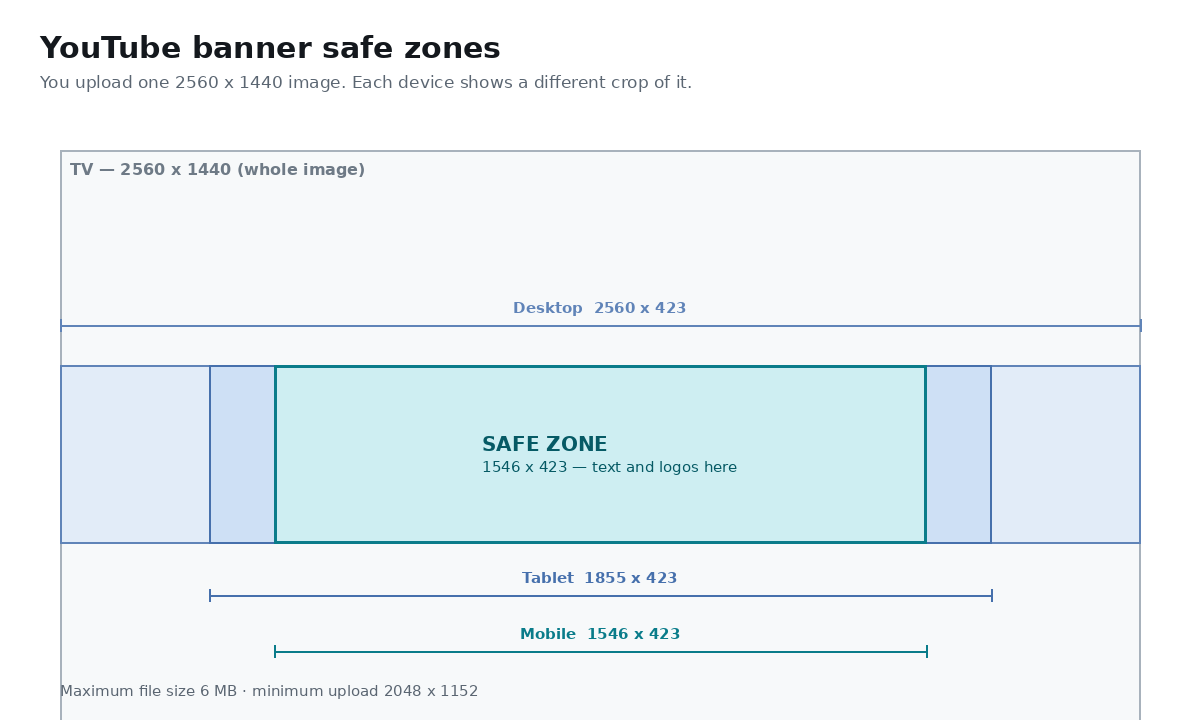
| Surface | Visible area | Notes |
|---|---|---|
| Recommended upload | 2560 × 1440 | Full 16:9 canvas — always design at this size |
| Minimum upload | 2048 × 1152 | YouTube rejects anything smaller |
| TV | 2560 × 1440 | The only surface that shows the entire image |
| Desktop | 2560 × 423 | Full width, heavily cropped vertically |
| Tablet | 1855 × 423 | Sides trimmed |
| Mobile (safe zone) | 1546 × 423 | Keep all text and logos inside this |
| Maximum file size | 6 MB | JPG, PNG, GIF or BMP |
How to design inside the safe zones
Think of the banner in two layers. The full 2560 x 1440 canvas is background: colors, patterns, or imagery that can safely extend to the edges and be cropped on smaller screens without losing meaning. The central 1235 x 338 safe area is where you place everything that must be seen, such as your channel name, tagline, upload schedule, and logo.
Because the visible area shrinks on mobile, keep your most important element, usually the channel name and logo, tightly centered. Use the background layer for atmosphere and the safe area for the message, and the banner will read clearly on a phone and a TV alike.
- Put channel name, tagline, and logo inside the 1235 x 338 safe area
- Let backgrounds and imagery bleed to the full 2560 x 1440 edges
- Center the most important element so mobile viewers still see it
- Avoid placing text near the outer edges where it gets cropped
- Keep the safe-area text large and high-contrast for small screens
Common use cases
A correctly sized banner sets the tone for a channel and reinforces its brand across every device. Creators of all sizes use one well-built banner to present their name, niche, and upload schedule at a glance.
- Launching or rebranding a YouTube channel
- Showing an upload schedule or tagline in the banner
- Keeping a consistent look across banner, thumbnails, and logo
- Updating channel art for a series, season, or campaign
- Cropping a wide graphic down to YouTube's exact 16:9 spec
Why build your banner in the browser
Design tools that live online usually upload your artwork, add watermarks on free tiers, or require an account. imgbox keeps your image on your device, adds no watermark, and asks for nothing, so you can crop to spec and export privately and for free.
You also get exact control over the safe zone. Instead of guessing whether your channel name will survive YouTube's device cropping, you position it inside the marked safe area and export at the full 2560 x 1440 resolution, confident it will display correctly everywhere.
How to make a YouTube banner
- Open the YouTube Banner Maker and load your background image or artwork.
- Crop to the full 2560 x 1440 (16:9) channel-art size.
- Position your image so the focal point sits within the central 1235 x 338 safe area.
- Keep your channel name, tagline, and logo inside that safe area so they show on every device.
- Export as a JPG or PNG under the 6 MB file-size limit.
- Download the banner and upload it to your channel's customization settings.
Frequently Asked Questions
What size is a YouTube banner?
The recommended YouTube banner size is 2560 x 1440 pixels, a 16:9 image. YouTube displays this same file at different sizes across devices, so only the central region is guaranteed to be visible everywhere.
What are the safe dimensions for a YouTube banner?
The safe area for text and logos is 1235 x 338 pixels, centered in the middle of the 2560 x 1440 banner. Keep your channel name, tagline, and logo inside this region so nothing important is cropped on phones or tablets.
What is the maximum file size for a YouTube banner?
YouTube limits channel art to a maximum of 6 MB. Export a well-compressed JPG or PNG at 2560 x 1440 to stay under that limit while keeping the image sharp.
Why does my YouTube banner look cropped on mobile?
YouTube shows only the central strip of your banner on phones and a wider area on desktop and TV. If your text or logo is placed outside the 1235 x 338 safe area, it gets cut off on smaller screens. Keep key elements centered.
What is the minimum size for YouTube channel art?
The minimum recommended upload is 2048 x 1152 pixels, but 2560 x 1440 is the full recommended size and looks best on large TV displays. Always keep important content inside the 1235 x 338 safe area.
Is my image uploaded when I make a banner?
No. imgbox crops and resizes your banner entirely in your browser using Canvas and WebAssembly, so your artwork never leaves your device and no watermark is added.
Is the YouTube banner maker free?
Yes. It is completely free with no account, no watermark, and no limits, so you can crop and export as many banners as you need.
Do I need design software to make channel art?
No. The YouTube Banner Maker runs in your web browser with nothing to install, and it keeps working offline once the page has loaded. You crop to the exact 2560 x 1440 spec and safe area right in the browser.
Related tools
Related guides