Passport Photo Maker
Create passport and visa photos at the right size — 35x45 mm, 2x2 inches and other country specs — with print-ready spacing. Free, runs entirely in your browser, so your photo is never uploaded.
The imgbox Passport Photo Maker is a free, browser-based passport photo maker that turns any portrait into a standard 3.5 x 4.5 cm (35 x 45 mm) passport photo in seconds. Crop, resize, and position your face to meet official passport and visa photo requirements without downloading software, creating an account, or paying a studio. Because it runs entirely in your browser, your photo is processed on your own device and is never uploaded to a server.
What a passport photo maker does and why it matters
A passport photo maker takes an ordinary head-and-shoulders photo and reshapes it to the exact size, framing, and proportions that passport, visa, and ID authorities demand. Most rejections happen not because of a bad camera but because the crop is wrong: the head is too big or too small, the face is off-center, or the final image is not the correct 3.5 x 4.5 cm size. This tool fixes all of that in the browser so you get a compliant photo on the first try.
imgbox does 100% of the work client-side using Canvas and WebAssembly, which means your face photo stays on your computer or phone. Nothing is uploaded, there is no watermark, and there are no limits on how many photos you make. That privacy matters for a document photo that carries your identity, and it also means the tool keeps working offline once the page has loaded.
- Resizes to the standard 3.5 x 4.5 cm passport/visa format used by most countries
- Keeps the face centered and correctly proportioned within the frame
- No account, no watermark, no upload, no usage limits
- Runs offline in your browser after the page loads
Sources: US Dept. of State — passport photos · UK Government — passport photo rules
Exact passport photo dimensions and specs
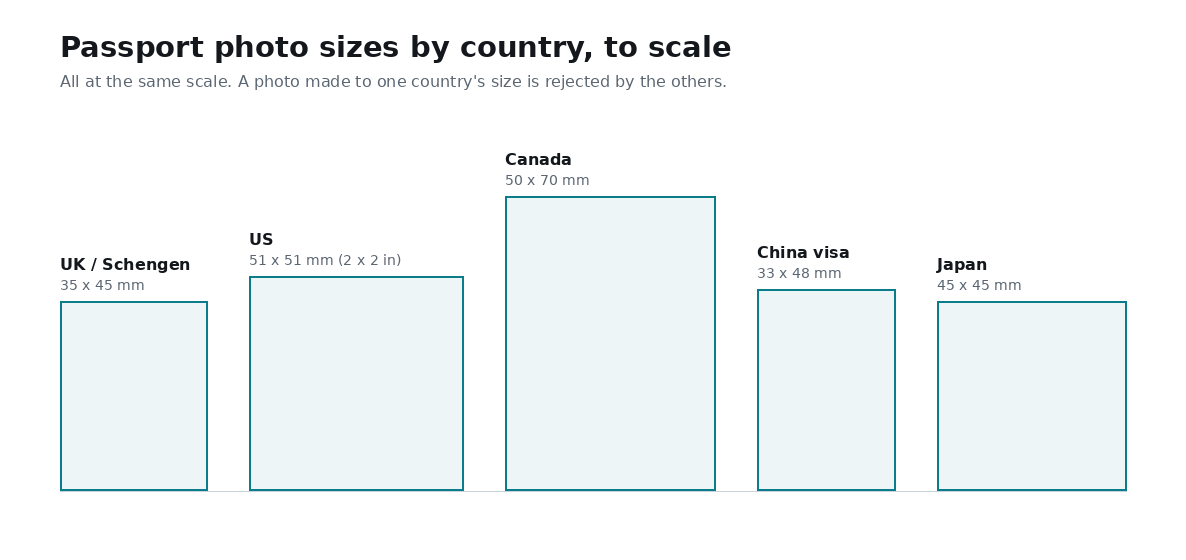
The most widely used passport and visa photo size is 3.5 x 4.5 cm, which is the same as 35 x 45 mm. This is the standard for the UK, EU/Schengen, India, Pakistan, Australia, and many other countries. The United States uses a different square format of 2 x 2 inches (51 x 51 mm), so always check the exact requirement for the country you are applying to.
Print resolution matters as much as the physical size. Passport labs typically print at 300 DPI (dots per inch), and at that resolution a 35 x 45 mm photo works out to roughly 413 x 531 pixels. Producing your image at this pixel count keeps it sharp when printed at true passport size.
- Physical size (most countries): 3.5 x 4.5 cm = 35 x 45 mm
- Pixel size at 300 DPI: about 413 x 531 px
- US passport size (exception): 2 x 2 in = 51 x 51 mm (about 600 x 600 px at 300 DPI)
- Head height: usually 70-80% of the photo (roughly 32-36 mm from chin to crown on a 45 mm photo)
- Background: plain, light, and uniform (white or off-white is safest)
How to meet official passport photo requirements
Sizing is only half the job; framing and image quality decide whether the photo is accepted. Use a photo taken against a plain, light background in even lighting with no shadows on your face or behind your head. Face the camera straight on with a neutral expression, eyes open, mouth closed, and both edges of your face visible.
When you crop in imgbox, position the crown of your head near the top of the frame and leave a small margin above it, then center your eyes roughly in the upper-middle of the photo. This keeps your head within the 70-80% height range that most authorities require and avoids the common rejection reason of a head that is too large or too small.
- Neutral expression, eyes open, mouth closed, looking straight at the camera
- No glasses glare, no hats or head coverings (except for religious reasons)
- Even lighting with no harsh shadows on the face or background
- Recent photo (usually taken within the last 6 months)
- Keep the head centered and sized to 70-80% of the total photo height
Common use cases
Beyond passports, the 3.5 x 4.5 cm format is used for a wide range of official documents, so one correctly cropped photo can serve several purposes. Making your own also saves the cost and travel of a photo booth or studio, and lets you retake and re-crop until the framing is right.
- Passport and visa applications
- National ID cards and residence permits
- Driving licence and student ID photos
- Exam admit cards and job application forms
- Printing a full sheet of copies at a local lab for physical prints
Why do it in the browser instead of a studio or app
A browser tool removes the two biggest downsides of studio photos: cost and turnaround. You can shoot on any modern phone, crop to spec at home, and either print at a local lab or upload the file to an online application. There is no software to install and nothing to sign up for.
Privacy is the other advantage. Because imgbox never uploads your image, your identity photo does not sit on someone else's server or get used to train anything. Everything happens on your device, which is exactly what you want for a document that proves who you are.
How to make a passport photo online
- Open the Passport Photo Maker and load a clear, front-facing portrait taken against a plain light background.
- Select the 3.5 x 4.5 cm (35 x 45 mm) passport preset so the crop locks to the correct aspect ratio.
- Drag and zoom to center your face, keeping the head at about 70-80% of the frame height with a small margin above the crown.
- Check that your eyes are level and roughly in the upper-middle of the frame with even lighting and no shadows.
- Export the photo at 300 DPI (about 413 x 531 px) for crisp printing at true passport size.
- Download the file and print it at a lab or upload it directly to your passport or visa application.
Frequently Asked Questions
What size is a passport photo?
For most countries a passport photo is 3.5 x 4.5 cm, which is the same as 35 x 45 mm. The United States is a notable exception and uses a square 2 x 2 inch (51 x 51 mm) photo. Always confirm the exact size required by the country you are applying to.
What size is a passport photo in pixels?
A 35 x 45 mm passport photo printed at the standard 300 DPI is about 413 x 531 pixels. A US 2 x 2 inch photo at 300 DPI is about 600 x 600 pixels. Producing your image at these pixel counts keeps it sharp when printed at true size.
Is this passport photo maker free?
Yes. imgbox is completely free with no account, no watermark, and no limits on how many passport photos you make. You can create, re-crop, and download as many times as you need.
Are my photos uploaded to a server?
No. All processing happens directly in your browser using Canvas and WebAssembly, so your photo never leaves your device. This is especially important for an identity document photo.
How big should the head be in a passport photo?
In most standards the head should take up about 70-80% of the photo height, which is roughly 32-36 mm from chin to crown on a 45 mm tall photo. Keep the face centered with a small margin above the head.
Can I use this for a visa or ID photo too?
Yes. The 3.5 x 4.5 cm format is used for many visas, national ID cards, driving licences, and exam forms. Check your specific document's requirement, since a few use different sizes such as the US 2 x 2 inch format.
What background should a passport photo have?
Use a plain, light, uniform background, typically white or off-white, with even lighting and no shadows behind your head. A busy or dark background is a common reason for rejection.
Do I need to install any software?
No. The passport photo maker runs entirely in your web browser. Nothing to download or install, and it keeps working offline once the page has loaded.
Related tools
Related guides